


Mini DLP Projector Setup: 2K/4K, Android, Wi‑Fi & BT
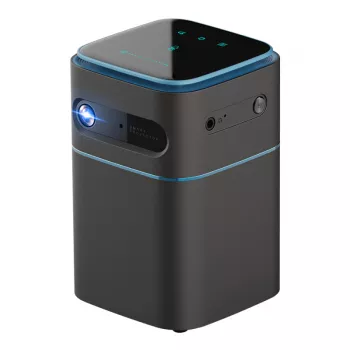
Portable Mini DLP Projector with 2K/4K Support, Android, Wi‑Fi, and Bluetooth: What to Expect and How to Use It
A compact DLP projector that runs Android and adds Wi‑Fi plus Bluetooth is built for quick setups—movie nights, travel, presentations, and flexible streaming. The real difference comes down to practical details: how crisp the image looks in your room, how stable streaming is on your network, how usable the built-in software feels, and how easily you can upgrade the sound. Below is a hands-on guide to what typically matters most and how to dial in better results fast.
Why DLP in a portable mini projector
DLP projection uses a tiny micromirror chip to form the image, a design known for delivering sharp edges and consistent focus across the frame in smaller housings. For a mini projector, that “evenness” can be the difference between readable subtitles and soft corners.
Portability is the other win: the compact footprint makes it easy to place on a nightstand, small table, or tripod for a quick, straight-on throw. For travel, it’s also simpler to pack, protect, and set up in unfamiliar rooms.
What to watch for with any mini projector: brightness is limited compared to full-size home theater units, so daylight viewing usually looks washed out. Fan noise can be noticeable at close range, and you’ll get the best contrast in darker spaces. If you want more background on the core tech, Texas Instruments has a helpful overview of DLP fundamentals here: Texas Instruments DLP Technology Overview.
Understanding 2K/4K support in a mini projector
“4K support” on many portable projectors typically means the device can accept a 4K signal and downscale it to the projector’s native resolution. That can still look excellent—especially if the source is high quality—yet the final detail level depends on the projector’s imaging chip resolution and processing.
Where higher-resolution sources can help most: text looks cleaner, fine patterns (hair, grass, fabric) can appear more natural, and compression artifacts may be less obvious if the stream or file has a strong bitrate. The flip side is bandwidth—if Wi‑Fi is weak, a “best quality” 4K stream may stutter or drop resolution automatically.
Quick clarity guide: source resolution vs. what you see
| If the source is… | The projector does… | What you’ll notice |
|---|---|---|
| 1080p | Displays directly or scales slightly | Solid sharpness for movies and gaming |
| 2K/1440p | Scales to native output | Slightly finer detail in text and edges (depends on native resolution) |
| 4K | Accepts and downscales | Can look cleaner than low-bitrate 1080p if the source is high quality |
Android built-in: streaming, apps, and offline playback
Android built into the projector can replace an external streaming stick, which is especially useful in hotels, dorms, and temporary workspaces. Fewer devices also means fewer cables to forget.
Common day-to-day uses include streaming apps, casting-friendly apps, web video, and local playback (USB files or network shares, depending on what inputs the projector supports). To keep things running smoothly, treat it like any small Android device: update the system when available, uninstall or disable apps you don’t use, and avoid leaving a stack of background apps open.
If Wi‑Fi is inconsistent and you’re playing a large movie file, local playback is often the most reliable route. For general Android TV and streaming behavior, Google’s official resources can help with troubleshooting basics and app support: Android TV Help Center.
Wi‑Fi and Bluetooth: choosing the best connection for each job
Wi‑Fi mainly handles streaming, app downloads and updates, and some types of casting/mirroring. Performance depends on distance to the router, wall materials, and neighborhood interference. If your projector supports both 2.4 GHz and 5 GHz, 5 GHz can be faster at short range, while 2.4 GHz sometimes reaches farther through walls.
Bluetooth is best for audio accessories—wireless speakers for bigger sound, or headphones for quiet viewing. Bluetooth is not typically used for sending video from a phone to a projector; casting is usually Wi‑Fi-based, and the lowest-latency option is still a cable connection when available. For deeper technical detail, the Bluetooth SIG maintains the formal spec library: Bluetooth Core Specification (Bluetooth SIG).
Connection choices at a glance
| Task | Best connection | Why |
|---|---|---|
| Streaming movies/TV | Wi‑Fi | Handles online playback and app access |
| Better sound | Bluetooth speaker/soundbar | Louder audio and fuller bass than most mini speakers |
| Late-night viewing | Bluetooth headphones | Private listening without disturbing others |
| Presentations | Cable (when possible) | More reliable and minimal lag |
Real-world setup: placement, focus, and screen size
Audio options: built-in speaker vs. external sound
Best uses: travel entertainment, backyard movies, and on-the-go presentations
Care, portability, and longevity
Recommended in-stock picks
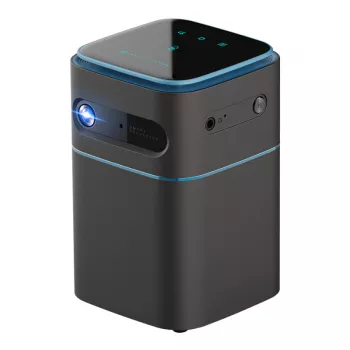
- Portable Mini DLP Projector with 2K 4K Support, Android WiFi, Bluetooth
- AI Tools for Professional Editing Guide – Complete Digital Download for Writers, Editors, Content Creators, and Designers
FAQ
Does 4K support mean the projector is native 4K?
Not usually. “4K support” commonly means the projector can accept a 4K signal and scale it to its native output resolution; the visible detail depends on the projector’s imaging chip and processing quality.
Can Bluetooth be used to connect a phone for video streaming to the projector?
In most cases, no—Bluetooth is typically for audio devices like speakers and headphones. Video casting or mirroring generally uses Wi‑Fi-based protocols or a direct cable connection.
How can a portable projector look brighter without upgrading hardware?
Reduce ambient light, shrink the image size, and place the projector closer to the wall/screen to concentrate brightness. Using a proper projection screen and choosing higher-quality sources/bitrate settings can also make the image look more vivid and cleaner.














Leave a comment